Review pages for coding agents.
The agent writes a short OpenUI Lang program, not HTML. You open it in the browser, click any part, and write a note. The agent gets each note with the name of the statement it points at, edits only those statements, and the page updates in place.
npx -y austere-axi --help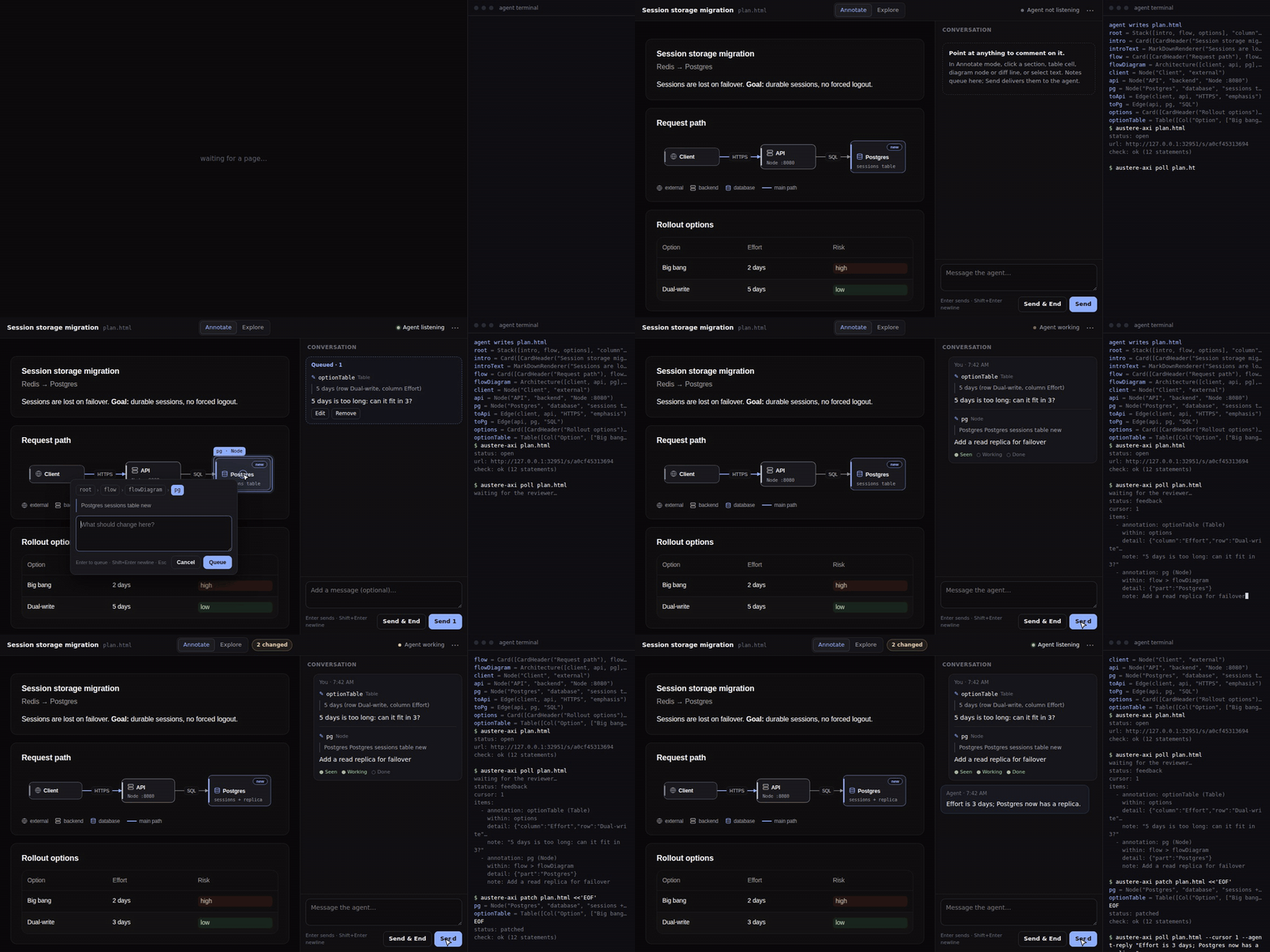
The review loop in about 30 seconds.
How it works
The loop is the one you would run with HTML, minus the HTML. The agent never writes markup, CSS or layout.
The agent writes a page
One statement per line, about 1,000 tokens for a full plan with a diagram, a table, a chart and a diff.
austere-axi checkvalidates it in Node, no browser.You review it
Click any section, table cell, diff line or diagram node and write a note. Pick options, fill the form, press Send. It also works on your phone.
The agent edits statements
Each note arrives with the statement name and line. The agent patches only those, and the page updates in place and flashes what changed.
What the agent writes
Statements, not markup. Names are what you click and what the feedback points back to.
root = Stack([intro, flow, options, decide], "column", "l")
intro = Card([CardHeader("Session storage migration", "Redis → Postgres"), introText])
introText = MarkDownRenderer("Sessions are lost on failover. **Goal:** durable sessions, no forced logout.")
flow = Card([CardHeader("Request path"), flowDiagram])
flowDiagram = Architecture([client, api, pg], [toApi, toPg])
client = Node("Client", "external")
api = Node("API", "backend", "Node :8080")
pg = Node("Postgres", "database", "sessions table", "new")
toApi = Edge(client, api, "HTTPS", "emphasis")
toPg = Edge(api, pg, "SQL")
options = Card([CardHeader("Rollout options"), optionTable])
optionTable = Table([Col("Option", ["Big bang", "Dual-write"]), Col("Risk", [Tag("high", null, "sm", "danger"), Tag("low", null, "sm", "success")])])
decide = Form("rollout", Buttons([Button("Send decision", @ToAssistant("Decision: rollout"), "primary")]), [strategyField])
strategyField = FormControl("Rollout", RadioGroup("strategy", [RadioItem("Big bang", "", "bigbang"), RadioItem("Dual-write", "", "dualwrite")]))
The gallery shows full pages next to their source and token count. In the playground you edit one and watch it render.
Install
You need Node.js 22.18 or later.
Let your agent do it
Install the setup skill, then ask your agent to “set up austere-axi”.
npx skills add MandalorianBatman/austere-axi --skill austere-setupOr do it yourself
Agents can run the CLI with no install. Optionally add a global command and the skill that tells agents when to make a page.
npx -y austere-axi --helpnpm install -g austere-axinpx skills add MandalorianBatman/austere-axi --skill austereClaude Code plugin or any MCP client
The plugin bundles both skills and the MCP server. Other clients (Claude Desktop, Cursor, Codex) run the same server: npx -y austere-axi mcp.
claude plugin marketplace add MandalorianBatman/austere-axiclaude plugin install austere@austere-axiThen: austere-axi spec prints the component reference, austere-axi plan.html validates and opens the page, austere-axi poll plan.html waits until you press Send. MCP client setup is in the install guide; the output-token comparison with lavish-axi is in the benchmark.